The Scattered Order Problem
Orders arrive from every direction. Instagram DMs, Facebook messages, WhatsApp chats, emails. Details get scattered and the list in your head grows louder.
You worry about missing an order. You worry about chasing payments. You spend evenings matching names to screenshots and still feel unsure everything is covered.
The BakeryGo Store solves this in one move. You share a single product link, customers place their order, and every order lands in one clean dashboard. Nothing slips through the cracks and you get back the time you were losing to admin.
What Actually Changes
All orders in one place so you never miss a request. Clear payment choices Cash, Bank Transfer and Card that remove anxiety for you and your customers. A professional experience that builds trust. Time back in your day to focus on baking and selling.
0% commission from BakeryGo, so you keep what you earn.
Why the Usual Methods Are Challenging
DMs across multiple apps are fast to start, slow to finish. Details get lost and orders get missed.
Manual bank transfers mean you wait and wonder when a payment will arrive. Customers worry about typing the right account details.
Building a full website to provide payment options is possible but costly and time-heavy. You still pay card processing fees and need to maintain it.
Marketplaces with commissions take a cut of your profit and make pricing tighter than it needs to be.
The issue is fit. None of these options are designed for the pace and seasonality of a small bakery business.
How the Store Works
There are two simple ways to use it. Start with either and switch at any time.
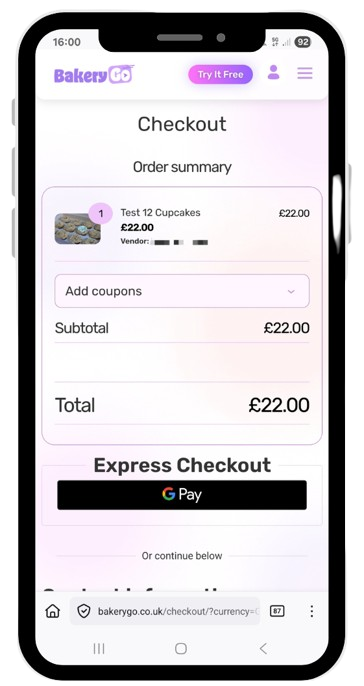
- Order management mode – Create a product link for your treat box, cupcake box, gift card, or seasonal item. Share the link. Customers check out and choose cash or bank transfer. Every order appears in your dashboard with quantities, dates, and names. You track orders in one place and monitor the payments separately.
- Card payments mode – Connect your Stripe account and turn on card checkout. Customers pay at the point of order. Funds settle to your Stripe account. BakeryGo charges 0% commission on orders. Standard Stripe fees apply as they would on any website.
Either way, you look organised. Customers feel safe. You can breathe easier.
Where This Helps
Seasonal treat box drops without inbox chaos. Set up a product for your Valentine box or Halloween cupcakes. Add description, pick-up or delivery notes, and quantity limit. Share the link on stories and in your bio. Orders flow into your dashboard instead of your DMs. Print or filter the list and prep with confidence.
Gift cards that remove payment worry. Create a gift card product link. With Stripe connected, customers pay by card in seconds and you see funds in your Stripe account. No waiting for a transfer. No follow-ups to check if payment landed.
Market stalls with quick checkout. Place a QR code at your table that points to a product link. Customers order and pay by card on their phone. You keep a running list in the dashboard, which helps manage stock during the day. It keeps the queue moving.
Why Bakers Use This
0% commission from BakeryGo – We don’t take a cut of your sales. You keep what you earn.
Card payments the way customers expect – Stripe handles secure card processing. Your customers pay in seconds and you reduce payment anxiety for everyone.
One dashboard for every order – No more juggling apps or losing track during busy seasons.
Built for bakers – Product links suit treat boxes, pre-orders, and date-based drops. You don’t need a full website to look professional.
How to Use It Well
- Add product links to your Instagram auto-reply and pinned highlights
- Place links in your Link in bio or Linktree so customers can order without sending a DM
- Print QR codes for market stalls and collection points
- Set cut-off dates and quantities to match your baking plan
- Use the dashboard to build a prep list the night before a big collection of orders
Common Questions
Do I need Stripe to start? No. You can start today and take cash or bank transfer while keeping all orders in the dashboard. Connect Stripe when you’re ready for card payments.
Where do card payments go? Straight to your Stripe account. BakeryGo doesn’t hold your money and we don’t charge commission on orders.
What fees apply for cards? Standard Stripe processing fees apply, as they would on any website. BakeryGo charges 0% commission.
Can I still track manual payments? Yes. Customers can choose cash or bank transfer at checkout in order management mode. You track everything in one place.
Will I still need to check DMs? You’ll receive fewer DMs because customers use the product link. When a message arrives, reply with a friendly note and the link so the order lands in your dashboard.
How It Fits Your Workflow
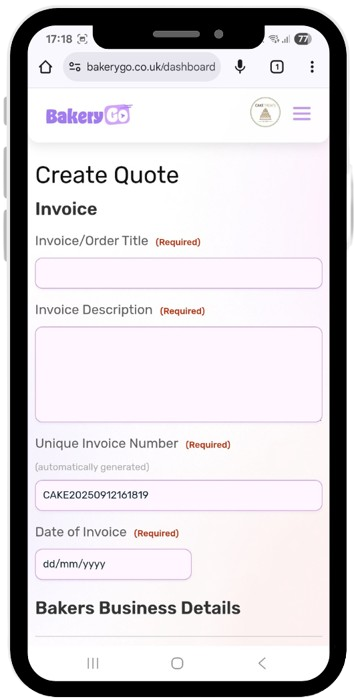
The Store pairs with the rest of BakeryGo. Price custom orders with the Pricing Calculator. Send a clear invoice with the Invoice Generator.
Each step removes friction and protects your time.
Try It with Your Next Seasonal Offer
The BakeryGo Store is ready when you create your account. Seven-day money back guarantee. Start with bank transfer and cash today. Connect Stripe when you want to accept cards.
Because orders shouldn’t be scattered across five apps. And you shouldn’t be chasing payments in your evenings.